


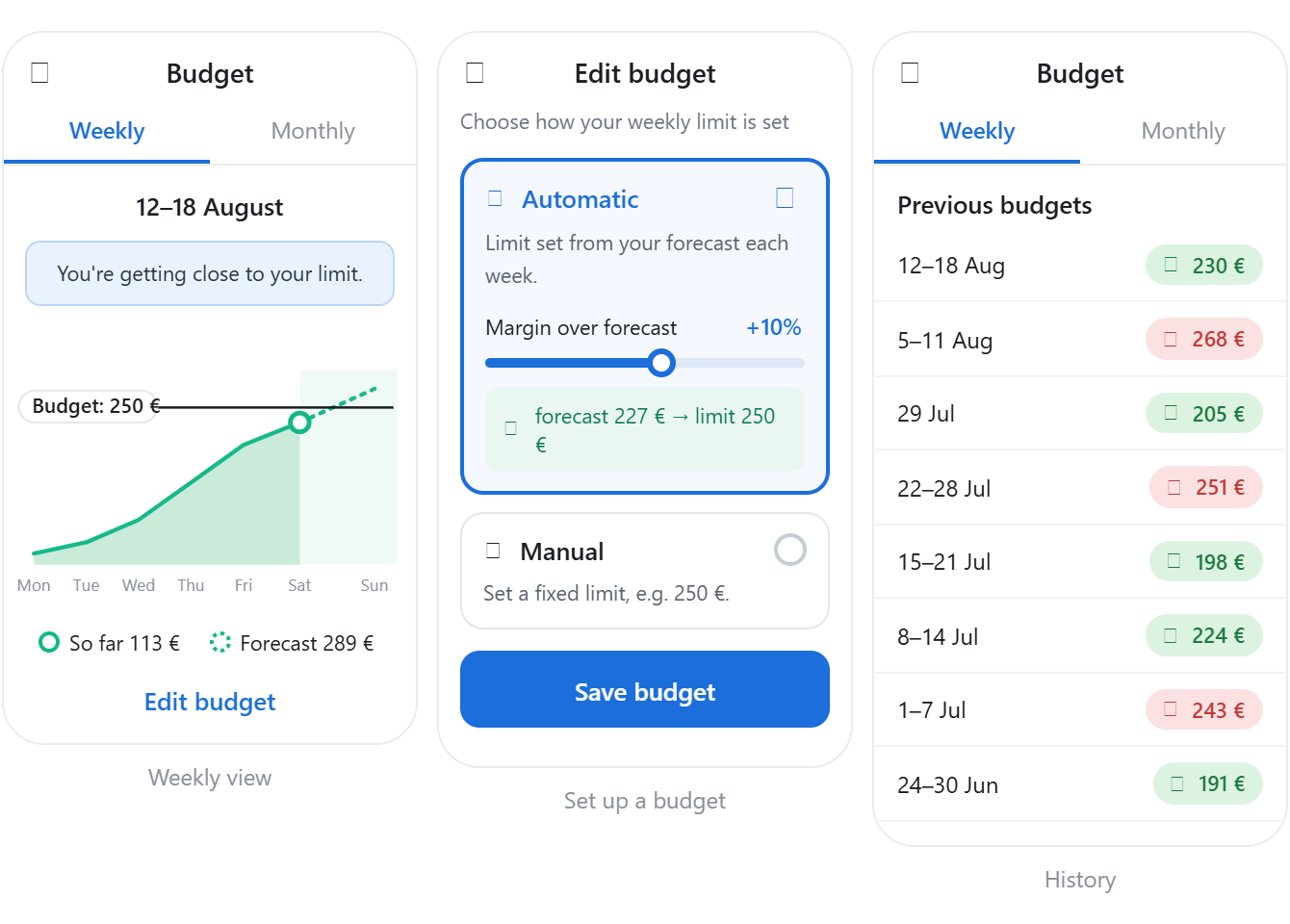
Budgets that set themselves, and show how you’re tracking
Budgets can now derive limits from forecasts, return cumulative progress for the current period, and report historical performance. All changes are additive; existing integrations require no changes.
Budgets can now derive limits from forecasts, return cumulative progress for the current period, and report historical performance. All changes are additive; existing integrations require no changes.
What's changing
Budgets now support three new capabilities on the existing Budgets API.
1. Automatic budgets
Set mode: auto to derive the budget limit from the location forecast. At the start of each period, the limit is calculated as:
limit = forecast × (1 + margin_percent / 100)The limit is then fixed for that period. margin_percent defaults to 20 and is clamped server-side to [-50, 50].
2. In-period progress
GET /budgets now returns series.consumption_cumulative and series.forecast_cumulative, with one value per step in the current period. Use these series to chart actual consumption against forecast without additional API calls.
3. Budget history
A new /budgets/history endpoint returns aligned limit and consumption series for past periods, making it easy to show under- or over-budget performance over time.
GET /budgets also returns a new config object describing how the limit is set: mode (manual or auto) and margin_percent.
Backward compatibility
These changes are fully additive:
modedefaults tomanualwhen omitted, so existing limit-based budgets behave as before.config,seriesand the history endpoint are additions and do not change existing fields.
What you need to do
Create an automatic budget
Omit limit and set mode to "auto":
PUT /v3/locations/{locationId}/budgets?fuel=elec&unit=energy&resolution=month

{
  "enabled": true,
  "mode": "auto"
}
Omit margin_percent to use the default of 20, or set it yourself, for example "margin_percent": 10.
To keep a fixed budget, continue sending limit as you do today:
PUT /v3/locations/{locationId}/budgets?fuel=elec&unit=energy&resolution=month

{
  "enabled": true,
  "limit": 200000
}
Read the current budget and progress
GET /v3/locations/{locationId}/budgets?fuel=elec&unit=energy&resolution=monthThe response now includes config and, once the budget has run, series with cumulative consumption and forecast data for the current period.
Read historical performance
GET /v3/locations/{locationId}/budgets/history?fuel=elec&unit=energy&resolution=monthEach index in limit and consumption represents the same period between from and to. Compare the values to tell whether the location was under or over budget.
Value for end users
- Zero-setup budgets. Auto mode creates a sensible budget from the forecast without requiring users to choose a limit.
- Clear progress. Cumulative series show actual consumption against expected consumption throughout the current period.
- Performance over time. Budget history provides a track record of periods under or over budget.